
If you own or run an auto repair shop, you know the signs of a bad day. Your techs have finished their jobs and are just hanging around waiting for their next assignment. When customers call to check on their repair status, they’re put on hold because the service advisor has to jog out to the bay to find out what’s happening. A repair order got messed up after the wrong part arrived because someone misread the tech’s handwriting. The worst part is that none of these happened because no one cared. They happened because the clipboard, paper, and whiteboard system is flawed. This is all easily fixable, though. All you need to do is digitize your shop floor management system. This guide will walk you through everything you need to know to get started.
What you’re losing by sticking with paper
The loss incurred on a shop floor that sticks to manual processes may not always show up as a single number, and that’s why they’re so easy to miss. But think about it like this. You run a shop with 6 technicians. On average, each of them loses 20 minutes a day because of a lack of coordination. This includes issues like waiting for work to be assigned, trying to track down parts status, or searching for a service advisor. That’s two billable hours you lose each day from each technician. If you’re billing $120/hour, that’s $240 you’re losing in a day and $60,000 lost in a year.
Paper inspection forms make it even worse. Imagine your technician finds a worn tie rod end and writes it on a paper form. The service advisor then reads it and has to explain the issue to the customer over the phone with absolutely no visuals to help, and hopes for a green light from them. Now consider the same scenario, but with photos or short videos that they can share with the customer. Now your customer can see the issues clearly, and the odds of them giving the go-ahead improve drastically. Shops that use digital vehicle inspection (DVI) tools report a 20% increase in average repair order (ARO) values in the first month.
What to look for in a digital auto shop floor management system
Not all shop management software is built equal; some may offer just the essentials, while others come with all sorts of bells and whistles. It’s up to you to decide whether the shop management system solves the specific problems that are costing you time and money. Here are some basics that any shop management software worth considering should cover:
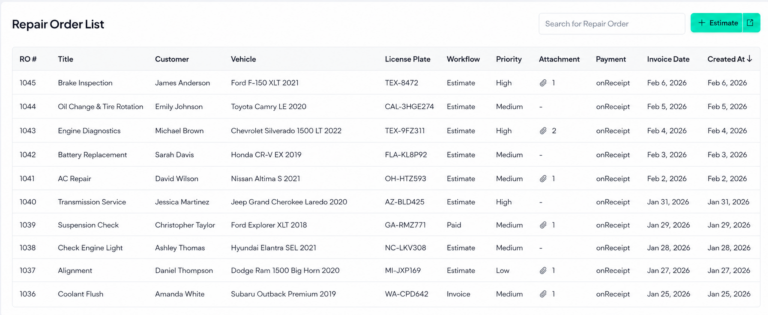
- Digital repair order management that your entire team can see and update, so nothing falls off the clipboard or gets misunderstood because of messy handwriting.
- Technician time tracking that logs hours automatically with each task they complete, rather than having to write them down and move them manually.
- Digital vehicle inspection (DVI) that allows technicians to attach pictures and add comments straight to the repair order, and sends the customer a link to view all that info and approve any extra services.
- Automated customer updates via text or email, letting them know when their car is checked in, when the inspection report is ready, and when their car is done, so your staff doesn’t waste half the day on phone calls.
- Parts ordering integration so your team can look up the availability of any parts they need and purchase those without needing to leave the repair order or pick up the phone.
- Live job board that’s visible to everyone and shows every vehicle in your shop, which bay it is in, what stage it is in, and who’s working on it.
- Analytics and reporting on data that matters, such as repair order average, productivity of your staff, and how long it takes them to perform tasks.
If your shop management system (SMS) allows your team to use tablets or mobile phones on the shop floor to punch in their tasks, do inspections, and highlight problems, communication becomes much more efficient.
How to digitize your shop floor management system in 5 easy steps
The good news is that you don’t need to shut down operations or hire an expensive consultant to make this happen. Most shops transition to a new SMS in approximately 2 to 3 weeks with barely any production loss. Here are the steps you can follow to make sure there are no disruptions to your business.
Step 1: Map your current workflow
This is pretty easy. All you need to do is follow a vehicle from check-in to delivery. Note down every handoff, communication, and point where there is a slowdown, delay, or error in the process. Speak candidly with your service advisors and technicians and find out where the friction is. Chances are, they already know what the issues are.
Step 2: Choose one problem to fix first
Trying to make too many changes at once will overwhelm your staff and kill any momentum you may have gained. Most shops begin by implementing either digital repair orders or digital vehicle inspections since these give immediate results that everyone can see. Once your team is comfortable with using a single tool, you can add more tools as needed.
Step 3: Have the right hardware in place
Your techs need mobile devices in the bays that allow them to clock in to work orders, perform inspections, and report issues without leaving their work areas. Make sure you have a reliable Wi-Fi signal throughout the shop. Even a single dead spot can make your SMS less effective.
Step 4: Make sure your team is on board
Loop your team in on what’s happening and block some time to train everyone before the switch. A tech who knows that the digital time capture will save their flag hours and cut down on their wait times will jump on board much faster than one who just feels like a new system is being forced upon them.
Step 5: Run the two systems in parallel for a while
Allow your team to continue using their paper process alongside the new digital system until they are totally comfortable with it. Then, once your crew has embraced the new system and you see it capturing everything you need, toss the paper for good.
How to find the right shop floor management solution
All of the steps you follow above will come to naught if you don’t have a good SMS system. There’s a clear difference between a “do-it-all” system and one built specifically for the auto repair shops that is very apparent when you’re in the middle of a busy day.
Way RepairTech was built from the ground up specifically for independent auto repair shops and does more than simply manage your current tasks. Here’s what you receive out of the box:
Repair order management: Build, track, and complete all repairs from estimate through invoicing on one platform. Everything, including labor, parts, discounts, and customer approvals, will be accounted for, freeing up your team to spend more time working on vehicles and less time doing data entry.
Smart service catalog: Ready-to-use services library, with adjustable labor rates, and parts kits to help service writers upsell with less effort.
Multi-shop management: If you run more than one location, you can manage them all from a single system with location-specific views, centralized reporting, and user access controls.
Analytics and reporting: Reports on revenue, labor, and customer lifespan can tell you the performance of your business and revenue opportunities you might be missing out on.
Marketplace boost: Way RepairTech subscribers get priority placement on the Way marketplace, which connects your shop to over 10 million drivers. Direct bookings, no lead broker fees, and no sharing the customer with three other shops.
Impressed? Book your demo and let us show you how it works in a shop like yours.