

Question
How do I add TSA PreCheck to Delta?
To add your TSA PreCheck number to your Delta account, log in to your SkyMiles profile using the Delta app or website. Then navigate to “Personal Details” or “Secure Flight Info” and enter your Known Traveler Number (KTN).
TSA PreCheck is a program run by the Transportation Security Administration (TSA) that provides you with expedited security screening procedures while departing from US airports. Once enrolled, the TSA will assign you a Known Traveler Number (KTN).
How to add TSA PreCheck to Delta
Before adding, be aware that Delta won’t ever ask for a ‘PreCheck number.’ The airline will always ask for your Known Traveler Number (KTN). Now, follow these steps to add PreCheck to your ticket.
- Log in to your Delta SkyMiles account.
- You can see an option to add your PreCheck details in your profile or account settings.
- Under “Personal Details,” you can see the field called The TSA PreCheck/Known Traveler ID.
- Enter your Known Traveler Number (KTN) there.
- Re-request your boarding pass.
- Then, ensure it has been added by reloading the boarding pass via the airline’s app or website.
How to add TSA PreCheck to the Delta app
Ideally, you can’t add your TSA PreCheck number directly using the Delta app. However, you can access your PreCheck information in the mobile app after adding your Known Traveler Number (KTN) to your profile via a web browser. Here’s how you can do it.
- Use a browser on your computer, tablet, or phone.
- Log in to your Delta SkyMiles account.
- Navigate to your profile or account settings.
- Find the option to update your TSA PreCheck details.
- Add your Known Traveler Number (KTN).
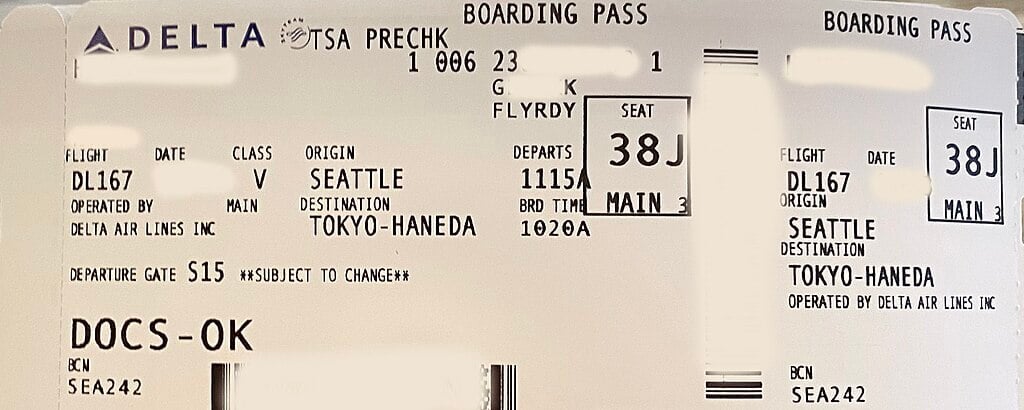
How to add TSA PreCheck to a Delta ticket
To add, you must first log in to your Delta account, find your reservation details, and add your Known Traveler Number under the “Passenger Details” or “Secure Traveler Information” section. Also, you can contact the Delta customer service to add the details.
- Sign in to your Delta account on the website.
- Access your reservations and trip details and choose the flight you want to update.
- Then, go to the section labeled “Secure Traveler Information” or “Secure Flight Passenger Data”.
- Type and enter your Known Traveler Number (KTN) into the selected field.
- Make sure that the name on your ticket matches the name on your KTN application, including your middle name or initial, if applicable.
- Save the info to update the reservation.
How to add TSA PreCheck to Delta after checking in
For this, you must update your info and get a new boarding pass issued so that the PreCheck indicator can appear.
- Log in to your Delta account using the Delta app or website.
- Get your reservation details by navigating to “Manage My Trips.”
- Search for the “Secure Traveler Information” or “Personal Details” section and add your Known Traveler Number (KTN) in the designated field.
- Save the changes.
- To get an updated boarding pass with the TSA PreCheck indicator, check in again.
- If you are unable to update it online, contact Delta customer service. They will help you add the KTN and check in.
How do I know if my Delta flight has TSA PreCheck?
To check if your Delta flight has TSA PreCheck, look for the “TSA PRE” indicator on your boarding pass. You can see the logo above the barcode in the top-right corner of your mobile boarding pass. This logo will appear on your boarding pass throughout your trip, irrespective of whether pre-screening security lines are available at the airport(s) from where you depart.
How much is Delta TSA PreCheck?
Currently, it costs $78, covering the cost of background checks and functioning costs. Membership renewal costs $70 if done online. Renewal in person costs $78.
How long is TSA PreCheck valid for?
The membership is valid for five years from the approval date. You can renew the membership online up to six months before the expiration date.
Start now and save up to $971 a year!


Way.com Services
Simple. Fast. Free.
Get affordable rates from trusted insurers in just a few clicks.

Upload
Provide your existing policy information

View
Get instant, accurate quotes with no hidden fees

Compare
See how your coverage stacks up against leading insurers

Switch & Save
Lock in your new rate; we’ll cancel your old policy

