If you search “auto repair shop management software” online, you’ll find several comprehensive guides. Most of them are generic and start with the basic “you need this software for your shop ASAP” pitch. Here’s also something they almost always skip: choosing the wrong software costs you pretty much everything.
Take Nicholas. He runs a repair shop with three bays with 2 techs. His choice of software is the cheapest one available, with limited features. Then, business picks up. He decides to add two more bays and hire a service advisor. The pricing and features that worked fine for a small crew are actually doubling his monthly bill. After thinking it through, Nicholas decides to switch to another software that can accommodate their present setup. But he finds out their contract has a 30-day cancellation notice, right in the middle of the summer rush, one of their busiest seasons.
Nicholas could have avoided these challenges by choosing a software system that could support the shop they were going to become.
That’s what this guide is for. We’re going to be honest about what the software actually is, what it should do, what it costs, what difficulties you might face, and how to shortlist the right one so that you’re not stuck with the wrong tool mid-season.
What is auto repair shop management software?
Let’s start with the definition of auto repair shop management software.
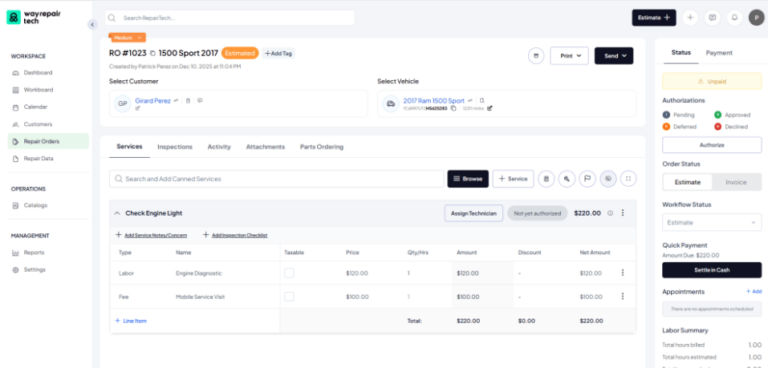
Auto repair shop management software is a digital platform that takes care of all the non-mechanical side of your business. From the moment a car pulls in, through the estimate, the inspection, the approval, the actual repair, the invoice, and the payment, to the communication with the customer that takes place between each step, everything is stored in one single place.
Who’s this software for? Realistically, it is for any repair shop. If you’re a solo operator, an independent shop with a handful of bays, a multi-location shop, or a specialty business, this software will work out for you. If you’re used to paper, spreadsheets, dry-erase boards, walking to and from the bays, and lots of customer calls, this software is a serious upgrade.
You need to keep in mind that there are a few other tools that are likely to come up in your search for a shop management system. They solve different issues, which is why it helps to know what each of them does.
Repair information software (like ALLDATA or Mitchell 1’s ProDemand) helps your techs diagnose and fix vehicles using wiring diagrams and OEM standards. Most shops end up needing both. This is why certain shop management software like Way Repair Tech includes features like OEM repair procedures and labor time reference look-up.
Auto repair point of sale (such as Clover Station Duo) is for all your transactions, not repair orders. It can also handle your parts inventory and invoicing, but isn’t really a substitute for shop management software. That said, some auto repair shop management software bundles a POS system as well.
Accounting software (think QuickBooks) is what most shop management software syncs with. It keeps track of the money that flows in and out of your shop.
Field service management (like Jobber) is built for businesses that travel to customers, such as mobile mechanics. If your shop is a fixed location, field service management doesn’t apply since you’re not dispatching your techs to any customers.
Core features you should look out for
Go through five websites, and you will see the same line repeated. “Everything you need to run a successful shop is included.” But what exactly does this mean?
Ignore this marketing tactic from some of the popular auto repair shop software, and you’ll see that all of them have several features in common. Those are the auto repair software features that are non-negotiable.
The following will help your service advisors get their hours back that used to go into manual scheduling, retyping the same quotes, answering customer calls, and finding out the status of each work order.
Repair order and estimate management
The software that you choose must be able to build and convert your estimates into a repair order in minutes. A repair order should show you customer and vehicle details as well as the status it’s at (Estimate, Authorized, Invoice, etc.), updated as the job moves forward through drag-and-drop, and a priority flag so a busy shop can tell what needs attention first.
Two things separate a genuinely good system from a passable one. The first is canned services (pre-designed templates for common jobs) that you can choose from, so you aren’t spending 15 minutes typing them in every time. The other is an “activity” tab to log your actions and when, such as updating the status to ‘Invoiced’ on July 09 at 12 pm.
If you zoom out from a single job, you should be able to scan the same details across your shop at once: a repair order list you can filter by status, workflow stage, or priority, without opening each job individually.
Digital Vehicle Inspection (DVI)
Digital vehicle inspection is a tool that lets you check a car’s condition using a tablet or phone with the help of checklists, photos, videos and color-coded reports.
Before, your customers used to look up car videos on YouTube to see what the issue with their cars was before they took them to the shop. Now, they type in their car troubles into AI tools and come up with a diagnosis on their own. Using visuals can help your service advisors save time on long conversations over the phone or in person on whether the AI explanation was right or wrong.
You’ll be able to find software like Way Repair Tech that gives technicians guided inspections and repair workflows through AI and AR. This can help newer or junior techs catch what an experienced tech might notice. Inspections will go faster without sacrificing accuracy.
This is also a benefit for your customers. When they can see the worn brake pad in a photo, the approval for the estimate tends to go quicker and with fewer follow-up calls.
Parts and inventory tracking
You should look for integrations with parts suppliers (PartsTech and Nexpart show up across most platforms) and automatic cost/markup rules so nothing quietly drains your profits. Real-time inventory becomes valuable when the shop gets busy, and you can’t keep track of your stock. Getting a live notification the moment something’s running low is helpful instead of a tech finding out the hard way mid-job. The better platforms track the stocks down to the specific warehouse, aisle, and bin, with the quantity and the total cost visible per location. It also lets you generate a purchase order straight from that view.
Customer communication/Customer relationship management (CRM)
A CRM is what lets you text two-way, conduct automated follow-ups, and view the entire history of the customer, instead of the details being scattered across invoices. Make sure the software you’re choosing has CRM configured into it, so you don’t require a separate app for all your customer communication.
You should be able to send templated messages through mail or text, for instance, an appointment confirmation, and the customer should be able to reply directly in a single reply, such as “reply 1 to confirm, 0 to cancel.” This tends to give you a more positive response.
One thing you should keep in mind: on some platforms, texting is a feature limited to a mid-tier plan or higher, not included at the entry level.
Scheduling and appointment booking
You should look for a calendar view where you can toggle between day, week, and month, as well as filter your techs individually or all at once. Otherwise, your advisor will schedule a tech who is not available. Booking should also be flexible. A good system lets you add a new appointment, log a follow-up, or block off a custom event.
You should be able to send appointment details through text or email. Once a car’s in the bay, your advisor should get real-time updates about where a job actually stands, so they don’t have to keep walking to the bay to figure out what’s going on with a RO.
Reporting and multi-shop visibility
You can’t really run a shop without any reports. You shouldn’t spend money without knowing what works and what doesn’t.
Your sales report should break revenue down by different categories (parts, labor, fees, fluids) alongside a month-over-month comparison. Some platforms give you insights such as “your top-selling item this month generated $X in sales,” or “sales are down 36% versus last month.” A serious platform should also offer reporting on payments, tax, outstanding invoices, and technician summaries by service or hours worked. If you’re running more than one location, all of this needs to be applied across shops, not just live inside each one separately. That’s how you catch a problem at one shop before it shows up in next month’s numbers.
Payments and accounting integrations
QuickBooks sync is close to universal at this point, and the better platforms tie it directly into the repair order itself rather than as a separate back-office step. Having built-in payment processing, with the ability to collect payment straight from the RO, is worth prioritizing over having it separately, because keeping track of multiple tools can cause more errors, especially when it comes to money.
A little extra
Then there’s something almost no platform in this category touches at all: getting new customers through the door in the first place. Way Repair Tech subscribers get priority placement on the Way marketplace, putting your shop in front of the millions of drivers already using Way. Most platforms manage just the cars already in your bay. This is to help you put more cars in your shop. It’s another factor to watch out for when you shortlist software, even if it’s not the deciding factor.
Cloud-based vs on-premise auto repair software
Choosing between cloud-based and on-premise software is a decision that can affect your remote access and long-term costs.
On-premise auto repair software runs on your computer and server that are physically sitting in your shop. Some owners want their entire data in-house, which is why a handful of shops still hold on to on-premise. It works without an internet connection, but comes with certain trade-offs, such as checking on the shop from home or another location isn’t really possible, and your techs don’t get mobile access. Scaling to a second location usually means buying more hardware and going through another installation.
Cloud-based auto repair software is where the vendor hosts your main server. This means you can access all your data anywhere with a signal through a website or app. All you need is a login. Updates happen automatically as needed by the vendor. Most cloud vendors invest more in security and backups to keep your data extra safe. Today, cloud-based software is the default for most repair shops.
Pricing works differently between the two. When you compare initially, on-premise seems to be cheaper because it usually only has a one-time license. However, this doesn’t include the hardware and the IT support you might need often. Cloud pricing works on a subscription basis that typically includes support and updates, so you don’t have to worry about any other surprise expenses.
How pricing works
If you check the pricing for auto repair shop management software, you’ll see that it’s generally sorted into three tiers:
The first tier is roughly $40–$100/month. It covers the basics: estimates, invoices, simple scheduling. It will work fine if you’re a solo operator, but you’ll likely outgrow the software fast.
The second tier is where most of the well-known platforms are. Tekmetric runs $199–$439/month, Shopmonkey runs $239–$499/month, and AutoLeap runs $199–$449/month. This has all the features you’ll need and is usually scalable.
Multi-location/enterprise tier is where you scale beyond the growth tier for larger groups, often on custom pricing with per-location fees.
Way Repair Tech starts at $195/month with 5 licenses included (perfect for a small shop) and goes up to $395/month for multi-shop and large businesses. Get a custom quote for your shop.
Here’s the part that can lead you to spending more than you hoped: a platform’s advertised price is rarely what you end up paying due to the add-ons. You might think those are just “included features” because they’re listed on the pricing page, but you’ll be surprised when the total comes out to be an entirely different number.
Avoid buying for the shop you are today with zero thought for the shop you’ll be in the next eighteen months. Ask every vendor how their software and pricing change as you add bays or locations before you sign the contract.
Shop size changes what you need
If you’re a solo shop and have 1–3 bays, you should prioritize speed and simplicity. So, multi-location reporting or complex role permissions are unnecessary. Rather, you need something your whole team can learn within a day, with clean estimates and basic DVI.
If you have 4–10 bays, this is where most of the “growing independent shop” features start to count, like approval of workflows, a little more advanced DVI, integrated scheduling, and inventory tracking that keeps up with a busier shop. You’ve likely got more than one advisor now, so consistency across how estimates get built and delivered is significant.
If you have 10+ bays or have multiple locations, reporting and visibility should become your priority. For this, you’ll require: cross-shop dashboards to see how things are running across locations, role-based permissions to ensure confidential information stays that way, and standard workflows so a customer gets the same experience whether they’re at location one or location four.
Where implementation usually goes wrong
- Transferring old customer records, repair histories, the parts database, and open ROs can sometimes lead to duplicates or errors if not done properly. To avoid this, take some time to look through your current data. Archive or delete the information you no longer need.
- Staff who aren’t comfortable with technology, or who’ve run the shop with a whiteboard for years, will need real time to adjust. Most vendors run a phased rollout and provide training so the switch isn’t jarring to your team.
- Moving from spreadsheets, paper, whiteboards, or other software to something new can slow down your regular operations. So, plan the implementation on a day with fewer appointments.
- Contract terms have a way of surfacing at the worst possible time, the way Nicholas found out his cancellation notice mid-season. Always read the fine print before you sign.
How to shortlist and demo shop management system
After you’ve narrowed it down to two or three software systems, run each one through the same checklist:
- Before you look at a single demo, write down how a car moves through your shop today: check-in, estimate, inspection, approval, repair, invoice, payment. Compare every platform against that, not a generic feature list.
- Don’t just watch a slideshow. Insist on walking an actual RO through the estimate, DVI, parts, approval, invoice, and payment in real time.
- If you might add a bay or a location in the next year or two, ask exactly how the software will change when you do. Get it in writing if you can.
- Check every integration you will use, whether it’s accounting, parts suppliers, payment processing, or CRM.
- Ask what happens to your customer records, vehicle history, and open ROs when you switch. You need a proper timeline, not just reassurance.
- Look specifically for cancellation notice periods and what happens to your data if you leave.
- Don’t just blindly roll out the new software. Run a minimum of 10 real tickets through the system. This is usually possible if the vendor provides a free trial.
Want to know how our shop management system can help your auto repair shop? Schedule a demo!
FAQs on auto repair shop management software
Repair information software gives technicians the information they need to help them figure out how to fix the car. Shop management software runs the business side, like repair orders, scheduling, invoicing, payments, and reporting. Some platforms tend to combine both.
For most shops today, cloud software is the go-to. On-premise still makes sense for some shops with an active but outdated system or shops that are located somewhere with unreliable internet, but that list is shrinking every year.
Realistically, it should cost somewhere between $40 and $500 per month, depending on your shop’s size and the tier you choose. You should factor in add-ons like texting, payments, and (if you’re multi-location) per-shop fees as well.
It depends on the size of the shop, the amount of data you have, and the features and integrations you’re opting for. According to our team, it takes about 12 to 15 days on average to completely install the Way Repair Tech.